Back to work
Qualify — the Review and send invite screen: a branching patient-intake flow with a running order summary.

00 · INTRODUCTION

Rebuilt around the question that shapes the care path

Qualify takes a clinic from a patient call to a completed medication order: identity, eligibility, exams, pharmacy, payment and delivery, in one workflow.

ROLE

Sole product designer, end-to-end

Product audit, flow architecture, interaction design, component library and prototype

TIMELINE

Three-week redesign · 2026

From audit to prototype

SCOPE

12 screens · 2 care paths · 7 edge states

Built on Untitled UI foundations

STATUS

Concept and prototype · iterated through six moderated sessions

Three front desk staff, two clinicians, one practice manager

CHALLENGE
One overloaded workflow served two fundamentally different care paths, exposing every downstream decision whether it was relevant or not.
OBJECTIVE
Separate those paths while keeping pricing, pharmacy selection and the handoff to the patient traceable from one workflow.

01 · AT A GLANCE

The whole study in four lines

  • Problem

    One page, nine decision groups, one phone call to price an order. Nothing carried decisions forward.

  • Key decision

    Ask care type first. The flow branches to two clinic screens for an exam invite or seven for a medicated order.

  • Evidence

    Four findings from the live page, three with external sources, then six staff sessions that changed three design decisions.

  • Result

    Pricing moved on screen and required network pricing phone handoffs fell from one to zero by design. In testing, none of six reached for the phone.

02 · THE STARTING POINT

What the live product asked of staff

The original product put the entire journey on one page. Clinic, care type, pharmacy, package, patient details, payer, delivery, addresses and attachments ran down a single scroll that ended in two competing actions. It worked, and it asked the staff to hold the whole order in their head.

THE ORIGINAL WORKFLOW · 1 PAGE · 9 DECISION GROUPS

The original Qualify order form as it shipped: one long scrolling page carrying nine decision groups, from clinic and care type down to pharmacy, package, delivery, addresses and attachments, ending in two competing buttons. Four numbered markers flag the problem areas.
Clinic
Saud
Patient State
California
Good Faith Exams & Orders
 
Prescription with Medication & Delivery
Staging Semaglutide Exam

1The fork hides in two dropdowns

Good Faith Exams and Orders sits beside Prescription with Medication. Filling either one silently decides the whole order, and nothing on the page says which applies to this patient or what changes if the wrong one is chosen.

  • Select Pharmacy
  • Patient Selects Their Preferred Pharmacy

Change Your Custom Pharmacy

Pharmacy Name
Columbia Valley Pharmacy (CVCH) Chelan
Address
105 S Apple Blossom Drive
City
Chelan
State
WA
Type
Retail
NCPDPID
4940056

Pharmacy Package

Provider Selects (Best Price)

2Pharmacy is a record, not a market

The chosen pharmacy renders as a data table down to NCPDPID, with no alternative to compare it against. Provider Selects, Best Price implies a comparison the interface never actually shows anyone.

Medication Delivery Method

  • Local pickup
  • Shipping

Patient Home Address

  • Patient Will Enter Home Address

Patient Shipping Address

  • Patient Will Enter Shipping Address

Shipping Address

  • Same as Home Address

3Address responsibility split three ways

Home address, shipping address and same as home appear as separate controls, making it unclear what the clinic completes and what the patient provides.

Attachments

  • Patient Will Upload Copy of Identification

CHOOSE FILENo file chosen

Send Invite Connect Instantly

4Two endings, equal weight

Send Invite and Connect Instantly carry the same visual weight, with nothing explaining the difference or which one this patient needs.

03 · THE PROBLEM

Nine decision groups at once, or only the steps each path needs

What a clinic passes through to send one invite

Before · 1 long page · 9 decision groups · 1 required network pricing phone handoff

  1. 1  Clinic
  2. 2  Care type
  3. 3  Pharmacy
  4. 4  Package
  5. 5  Patient details
  6. 6  Payer
  7. 7  Delivery
  8. 8  Addresses
  9. 9  Attachments

9 decision groups, no visible progress

After · 3 tracked stages · 2 care paths · 0 required network pricing phone handoffs

  1. 1  Patient information
  2. 2  Medical needs
  3. 3  Shipping and documentation
  4. THEN
  5. Send invite or connect live

Good Faith: 2 clinic screens · Prescription: 7 clinic screens

Every decision carried forward

04 · PRODUCT AUDIT

What the audit found

I read the live page three ways: as a first time user meeting it cold, as the person who fills it every day, and as the order it eventually produces. Four findings recurred. The only quantitative claim I counted myself is nine decision groups on one page.

The only required network pricing phone handoff

INSIDE THE PRODUCT

  1. Invite
  2. Patient form
  3. Exam and order set
  4. ?
  5. Price approved
  6. Payment
  7. Shipping
  8. Filled

OUTSIDE, ON THE PHONE

Pharmacy quoted by phone

Nothing saved when staff return

THE FOUR FINDINGS

  • OBSERVED A

    The page was the memory

    Nothing on the page records what has been decided. With no running summary and no progress model, recall sits with the person filling the form, which is where entry errors get in.

    SUPPORTING RESEARCH

    Cowan’s model estimates a focus of roughly four chunks. This audit counted nine distinct decision groups on the live page.

    Cowan · 2001 · Behavioral and Brain Sciences

  • OBSERVED B

    Two products forced into one form

    Good Faith exams and medicated orders have different endings, but the page treated them as the same checkout.

    SUPPORTING RESEARCH

    In checkout research, form field count affects usability more than the number of steps. The same pressure applies when one form serves two outcomes rather than one. This is supporting pattern evidence, not healthcare specific validation.

    Baymard Institute · 2024 · Checkout UX research

  • OBSERVED C

    Best price, with no prices

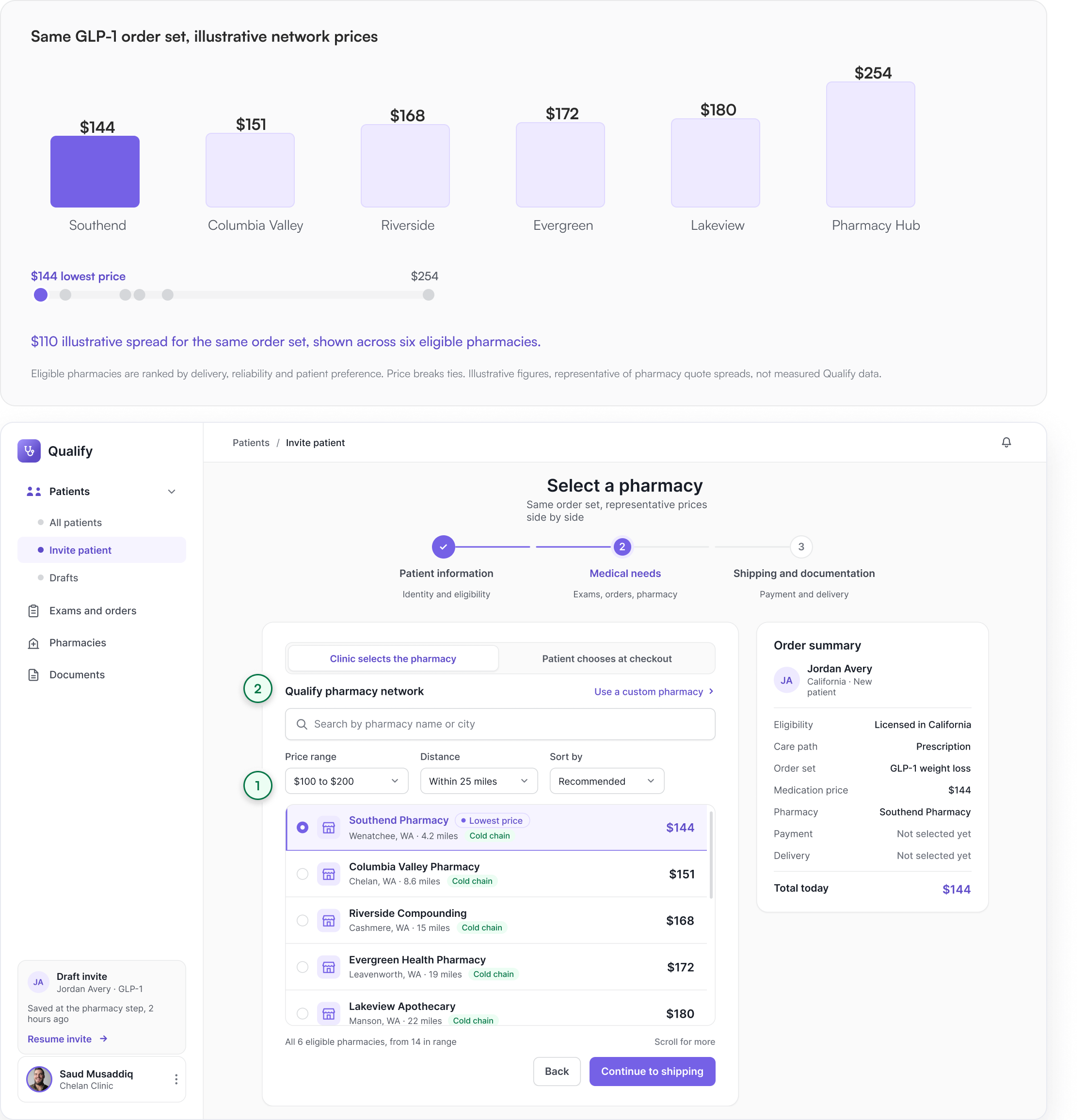
    The page carried a Pharmacy Package field set to Provider Selects, Best Price, yet no price appeared anywhere on it. With nothing to compare on screen, the comparison can only happen on the phone. On the GLP-1 set, illustrative network quotes spread by $110.

    ILLUSTRATIVE MARKET CONTEXT

    Only 3% of surveyed patients reported comparing costs across providers before receiving care.

    Mehrotra et al. · 2017 · Health Affairs

  • INFERRED D

    Nobody owned the next step

    Three scattered checkboxes quietly decided whether the clinic or the patient handled pharmacy, address and identity. Nothing on the page states who owns the next step, so ownership is a side effect of defaults rather than a decision anyone records.

    SUPPORTING PATTERN

    When responsibility for a step is not stated on screen, it becomes a side effect of defaults. This is a general interface pattern, not a healthcare specific finding.

    Pattern observation from this audit, no external source

05 · STRATEGY

Four moves that carried the redesign

  • The rail remembers

    A persistent order summary carries the patient, order set, price and logistics across every screen, so staff rarely have to reconstruct the order.

    Answers finding A

    Before and after of the order summary: a bare panel with two empty rows, beside the redesigned rail carrying stacked line items and a highlighted total.
  • Ask the fork first

    The care type question moved from a buried field to the gate of step two. Everything after it exists only if the answer demands it.

    Answers finding B

    Before and after of the care type question: a plain dropdown row, beside two selectable option cards with the second one chosen.
  • Prices compare on screen

    The pharmacy network became a searchable, filterable comparison. Eligibility filters, delivery and reliability rank, price breaks ties. Custom pharmacies sit outside it.

    Answers finding C

    Before and after of pharmacy selection: a single static field, beside a ranked list of options with the lowest price marked.
  • Name who does what

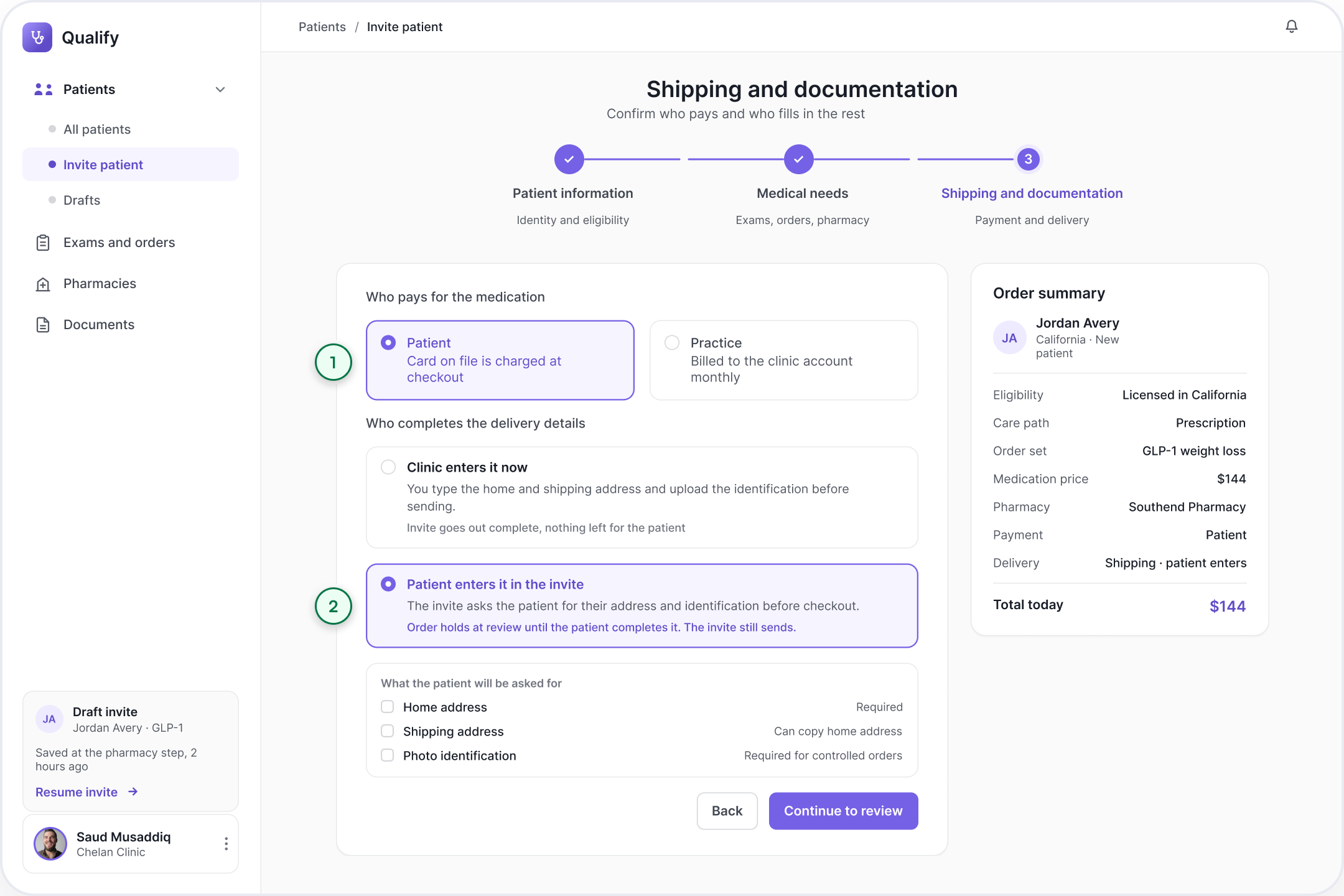
    Pharmacy choice, address entry and identification became explicit ownership choices between clinic and patient, replacing scattered checkboxes.

    Answers finding D

    Before and after of ownership: three loose checkboxes, beside three explicit clinic-or-patient assignment rows.

06 · WORKING WITH OTHERS

Where the decisions were not mine alone

The decisions involving prescribing, money and liability were worked through with the people responsible for that risk.

  • Clinical lead

    Signed off the prescribing boundary and what front desk may never release

  • Pharmacy operations

    Set the eligibility filters and confirmed what a quote can promise

  • Engineering

    Replaced live rate queries with a nightly refresh and an on-demand stock check

  • Compliance

    Required state licensing at step one instead of the review screen

  • Support

    Identified the top three support-ticket themes, all related to pricing

The one I lost, and what it bought

MY POSITION

Query every pharmacy live at the moment of comparison, so the price on screen is the price charged. Anything cached is a promise the product cannot keep.

ENGINEERING POSITION

Five live calls inside a form step adds seconds and a failure mode per pharmacy. Rate cards move slowly. A nightly pull plus one stock check is accurate enough and materially cheaper to operate.

WHAT WE SETTLED ON

Nightly rates, live stock on request, and a thirty minute quote lock. If the quote moves before send, the summary refuses to stay silent and the total never updates quietly.

DECISIONS I INFLUENCED BEYOND THE INTERFACE

MVP scope
Good Faith goes first. It avoids pharmacy integration, allowing the team to test the fork with less delivery risk.
Data requirement
Ownership per line item became a required field in the order model, not a UI flag.
Operational policy
A price ceiling per practice, so front desk can choose a pharmacy without a clinician in the loop.
Risk accepted
Nightly rates over live quotes, on the condition the interface never presents a stale total as final.

07 · THE MAP OF THE FLOW

Two branches, three switches, one ending choice

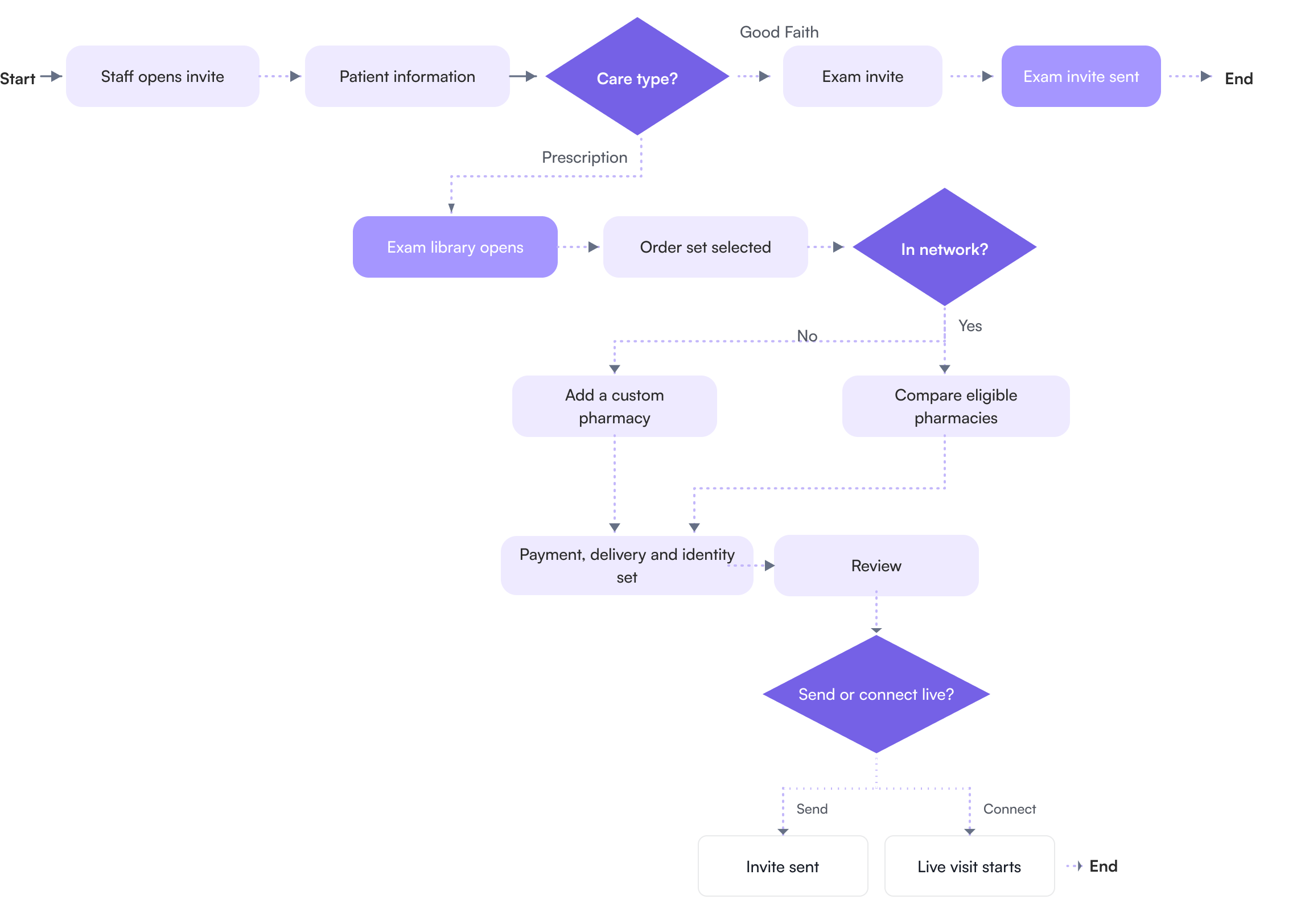
Care type is the branch that reroutes the whole journey: Good Faith ends with a sent invite, Prescription runs the full pipeline. Inside that pipeline a second branch, in network or not, decides how the pharmacy is found. Three switches assign ownership rather than route: who picks the pharmacy, who pays, and who completes delivery and identity. The final choice determines the ending: send an invite or connect live. This map covers the clinic half only. What follows, identity and consent confirmed, clinician approval, then release of the medication order, is described in sections 16 and 18.

Flowchart of the Qualify intake flow: it starts with staff opening an invite and entering patient information, then a Care type decision splits into a Good Faith branch that ends with an exam invite sent, and a Prescription branch that runs the exam library, order set selection, an in-network decision for pharmacy, payment, delivery and identity, review, and a final send-or-connect-live choice.
  • Staff action
  • System response
  • Decision
  • Ending

The six decisions the flow adapts to

  • Care type

    • Good Faith exam only
    • Prescription with medication
  • Visit mode

    • Send an invite
    • Connect instantly
  • Pharmacy choice

    • Clinic selects from the network
    • Patient chooses under a price ceiling
  • Who pays

    • Practice account, monthly
    • Patient card at checkout
  • Detail entry

    • Clinic completes it now
    • Patient completes it in the invite
  • Network availability

    • In network, compare
    • Not in network, add custom pharmacy

08 · WHAT EACH PATH REQUIRES

What the fork buys back

Splitting the paths only matters if the short path is genuinely shorter. These are counts taken from the flow, not timings.

Before: nine decision groups exposed together on one page with one required phone handoff. After, Good Faith: two screens, only the steps that path needs, no phone handoff. After, Prescription: seven screens with the price settled at pharmacy selection.

Good Faith never reaches order sets, pharmacy comparison, payer or delivery. Those groups are not shortened, they are never asked.

The seven: patient information, care type, exam and order set selection, pharmacy, payment and delivery, review, send or connect. Sections 10 to 16 walk through them in order.

09 · UI FOUNDATION

The system underneath

Untitled UI provides the foundation: neutrals, corner radii, type scale and input patterns. Qualify adds the product voice through a periwinkle ramp built around its inherited accent. Every screen uses the same compact component kit.

Color

The periwinkle ramp from 50 to 700, with 400 marked as the accent inherited from Qualify.

Product UI type

Product UI type scale: Display xs 24 for page titles, Text md 16 for card titles, Text sm 14 for labels and nav, Text xs 12 for meta and captions.

Component kit

The compact component kit: primary and secondary buttons, a text input, a care-path selection card carrying a price, and a badge.
The three-stage progress indicator: step one patient information, identity and eligibility, currently active; step two medical needs, exams, orders and pharmacy; step three shipping and documentation, payment and delivery.

Interaction states

Input states: default, selected, disabled and error, each shown with its label and placeholder.

10 · PATIENT INFORMATION

State licensing settled at step one, not at the end

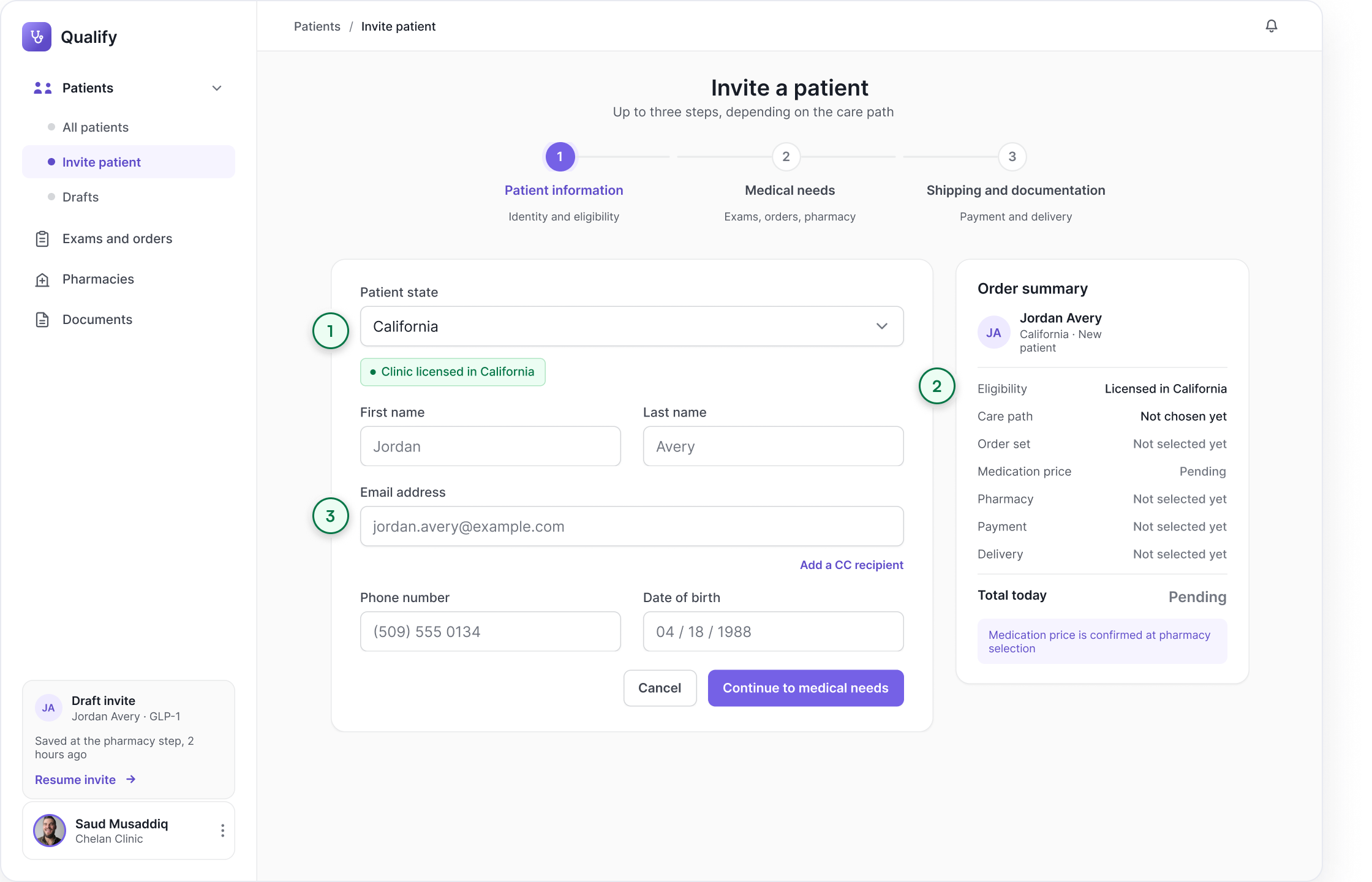
Step one captures identity and checks state eligibility while staff are still on the phone. The order rail begins with patient context, then carries each later decision forward.

Qualify invite-patient screen, step one of three: patient state set to California with a green “Clinic licensed in California” confirmation, first name, last name, email, phone and date-of-birth fields, and an order summary rail where order set, medication price, pharmacy, payment and delivery all read as pending.
  1. 1State eligibility is checked before clinical choices
  2. 2The rail opens with eligibility and identity, later decisions stay visibly pending
  3. 3Identity staff can finish mid call

11 · THE CARE TYPE FORK

The fork that shapes the flow

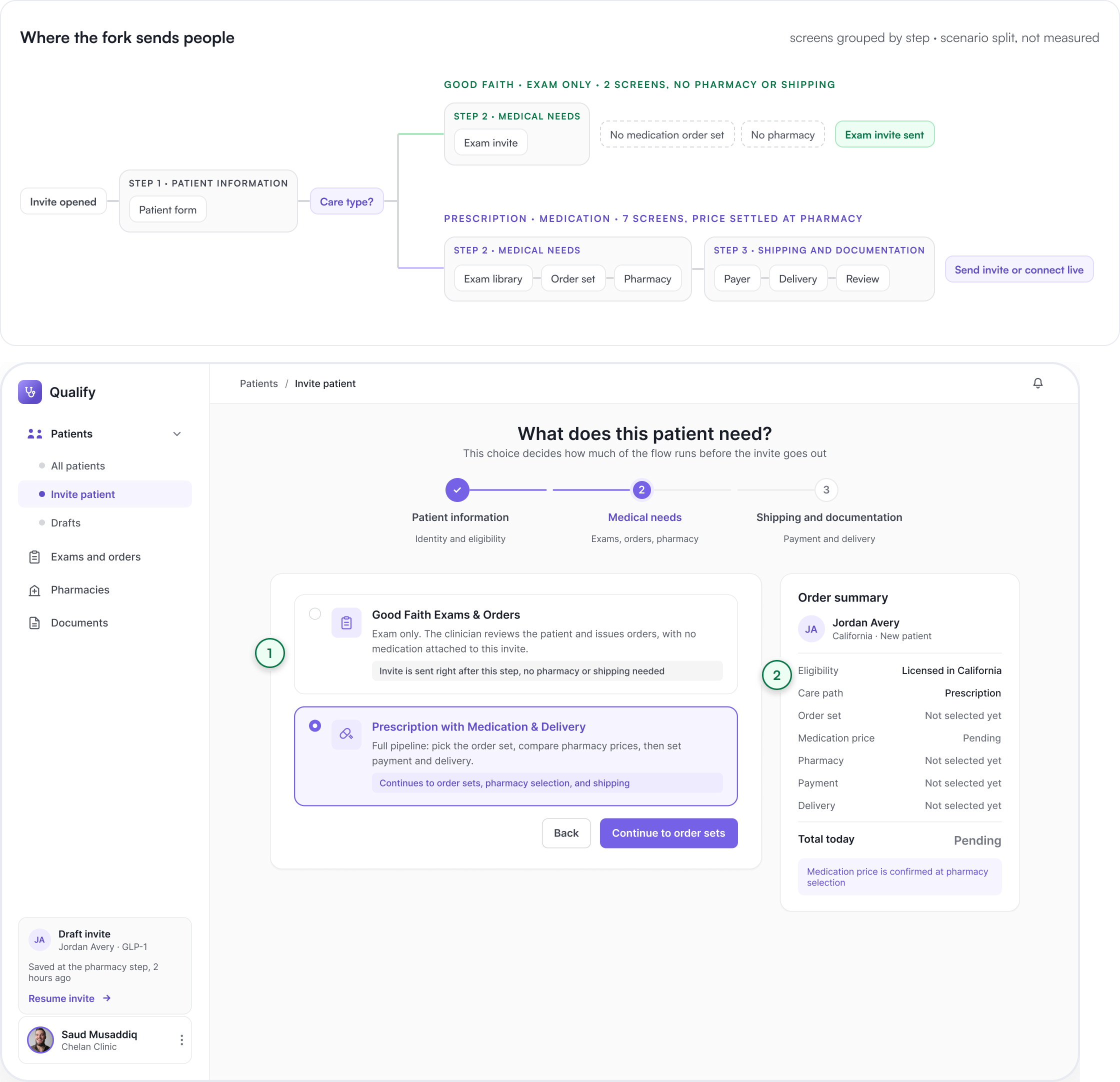
One choice, two paths. Good Faith sends an exam invite after this step and skips pharmacy and shipping. Prescription continues through order set, pharmacy, payment and delivery.

Two stacked views. Above, a map titled “Where the fork sends people”: an opened invite runs through step one, patient information, to a Care type decision that splits into Good Faith, exam only, two screens with no pharmacy or shipping, and Prescription, medication, seven screens with price settled at pharmacy. Below, the Qualify medical-needs screen asking “What does this patient need?”, with two radio cards: Good Faith Exams and Orders, where the invite is sent right after this step, and Prescription with Medication and Delivery, which continues to order sets, pharmacy selection and shipping.
  1. 1Each option states its own consequence before it is picked
  2. 2The rail records the care path immediately, everything downstream stays pending

12 · EXAM LIBRARY AND ORDER SET

From exam library to selected order set

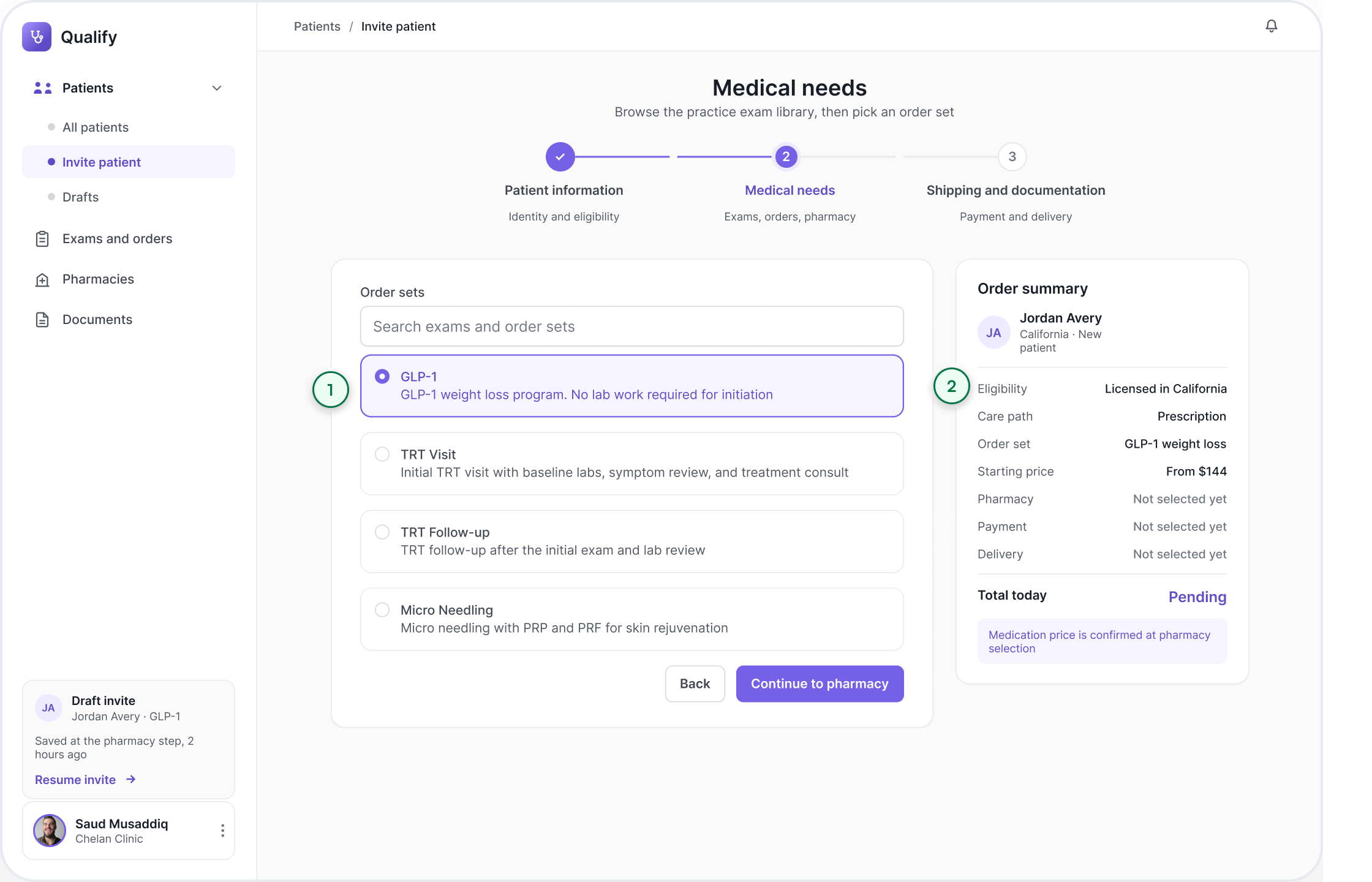
Practice protocols live in one searchable library. Selecting one adds its order set and starting medication price to the summary rail. The final price is confirmed after pharmacy selection.

Qualify medical-needs screen showing the searchable exam library: radio cards for GLP-1 at $144, TRT Visit at $189, TRT Follow-up at $62 and Micro Needling at $164, with GLP-1 selected and the order summary rail now reading GLP-1 weight loss, starting price from $144, and pharmacy, payment and delivery still to come.
  1. 1Practice protocols in one searchable library
  2. 2The starting price enters the rail

13 · PHARMACY AND PRICING

A market where there was a phone call

Six network pharmacies pass eligibility for this order set: state, accreditation, stock and cold chain. Search, price range and distance sort what remains, so network pricing is no longer a secret the clinic learns by dialling. A custom pharmacy sits outside this comparison and is still quoted directly.

Two stacked views. Above, a bar chart titled “Same GLP-1 order set, illustrative network prices” comparing six eligible pharmacies: Southend <img src=
  1. 1The network as a market
  2. 2Eligibility filters first, price breaks ties

14 · PAYMENT AND DELIVERY

Logistics as decisions, not emails

Payment and delivery ownership are explicit choices. The clinic can enter the address and identification now or assign them to the patient, with the order held at review until completion.

Qualify shipping and documentation step: radio cards set whether the patient or the practice pays, then whether the clinic enters the delivery details now or the patient completes them inside the invite, next to a live order summary totalling $144.
  1. 1Who pays is a switch
  2. 2Delivery ownership is explicit

15 · REVIEW AND SEND

The whole story on one screen

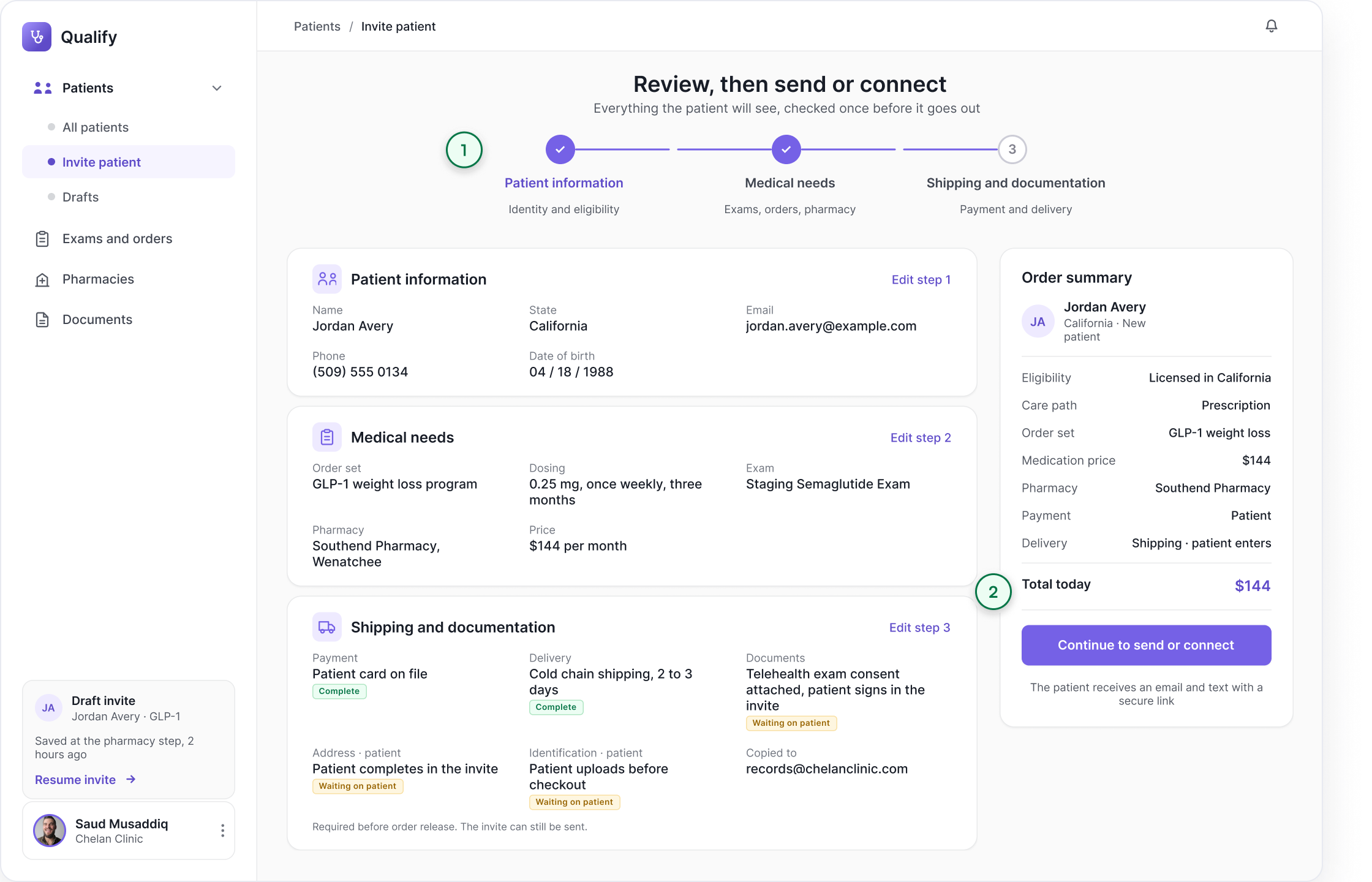
Review brings identity, medical needs and logistics into one editable record. Each section links back to its source step before the flow continues to send or connect.

Qualify review and send screen: patient information, medical needs and shipping and documentation gathered into one record with an edit link back to each step, beside the order summary and a continue to send options button.
  1. 1Every decision returns in one editable review
  2. 2One action leads to the send or connect choice

16 · CONNECT LIVE

When the patient is already on the phone

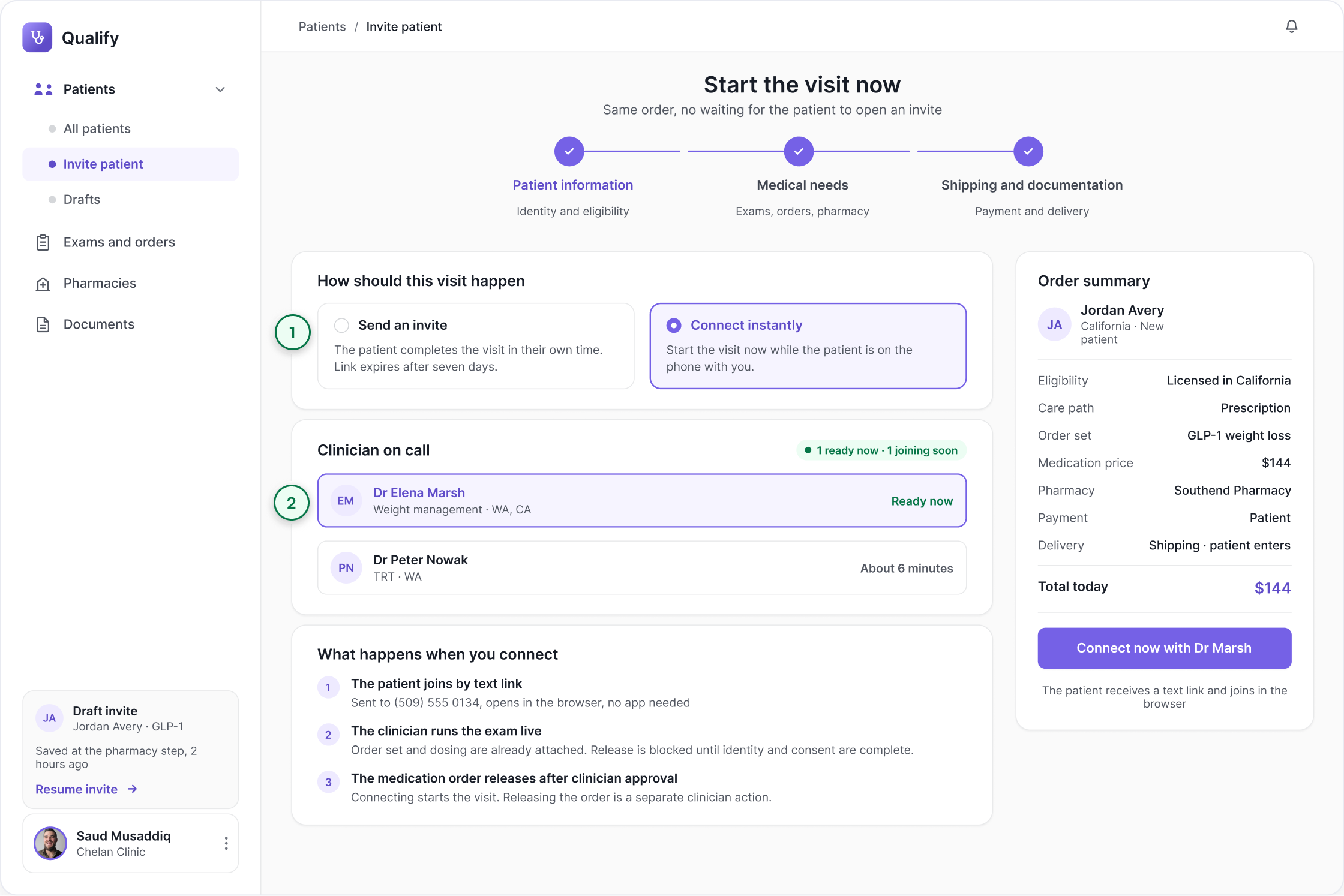
The original page ended in two equally weighted buttons, Send Invite and Connect Instantly, with nothing explaining the difference. The redesign makes it a decision with consequences: send and the patient completes in their own time, connect and the patient is handed to a clinician for the live visit, order set and dosing already attached. Front desk prepares either ending. Only a clinician takes the call.

Qualify connect live screen: a choice between sending an invite and connecting instantly, a clinician on call list showing who is ready now and who is about six minutes away, the three steps of a live visit, and a connect now with Dr Marsh button.
  1. 1Each ending explains what happens next
  2. 2Availability is shown before the clinic commits

17 · VALIDATION

What testing changed

Six sessions across three clinics: three front-desk staff, two clinicians, one practice manager. Each ran one Good Faith invite and one medicated invite on the prototype. The goal was to identify breakdowns, not benchmark performance.

  • 6 of 6

    Completed a medicated invite

    unaided, first attempt

  • 1 of 6

    Chose the wrong care path

    noticed at the order set step, then corrected

  • 5 of 6

    Could not say who finishes the address

    before the ownership line was added

  • 0 of 6

    Reached for the phone to price

    the one handoff the audit flagged, unused

  • 5 of 6

    Used the summary rail to answer a question

    without being prompted

WHAT THE FIRST ITERATION GOT WRONG

  1. A

    The fork was too quiet

    WHAT HAPPENED

    Four of six skimmed past the care type choice and only noticed at the order set step. The two options sat as equal weight radio cards with no consequence stated.

    WHAT CHANGED

    Each option now states what it commits you to before you pick. Good Faith says invite sent right after this step. Prescription says continues to order sets, pharmacy and shipping.

  2. B

    The summary rail was read, not trusted

    WHAT HAPPENED

    Staff used the rail to answer questions but three of six still scrolled back up to re-check the pharmacy before sending, because the rail showed a name with no price attached.

    WHAT CHANGED

    The rail now carries the confirmed price next to the pharmacy, and marks anything still pending in the same line rather than in a separate state.

  3. C

    Five of six could not tell who finished the address

    WHAT HAPPENED

    Five of six could not say whether the clinic or the patient would complete the address, which is the exact failure the audit found on the live page.

    WHAT CHANGED

    Ownership moved out of checkboxes into a named line per item, clinic or patient, shown in the summary and repeated in the review screen.

18 · ROLES AND RESPONSIBILITY

Who is allowed to do what

The workflow moves between three parties: front desk, clinician and patient. Sections 10 to 16 name who owns each step. Section 16 is the one screen that shows a handoff happening, with a named clinician and a separate release action.

Where responsibility transfers: front desk opens the invite and enters identity, the clinician reviews and approves, the pharmacy fills, and the patient completes their own half — every transfer stamped in the audit log.
  • Audit log

    Every field change records the user, role and timestamp. This is a design rule agreed with compliance, not a screen in this study.

  • State licensing

    Checked at step one. An unlicensed state stops the flow before any clinical decision.

  • Identity verification

    Patient uploads ID in the invite. The clinician confirms it before releasing the order.

  • Prescription authority

    Only a licensed clinician can sign or release an order. Front desk prepares, never releases.

  • Consent and privacy

    Consent captured in the invite. Patient data stays in the record, never in email.

19 · THE PATIENT SIDE

The half the patient has to finish

Handing address, identity and payment to the patient only works if the patient half is shorter than the clinic half. It runs on the same three stages, so a stalled order is always stalled at a named step.

PATIENT SIDE PROTOTYPE FLOW

What the patient receives: the invite arrives, then step one identity, verify it is you and upload ID, step two delivery, confirm address, and step three payment, see the price and pay, ending at confirmed.

WHAT ONLY THE PATIENT HALF CAN BREAK

  • Identity mismatch

    Name does not match ID

    Held for clinic review. Never automatically rejected.

  • Payment declined

    Card refused

    Order stays intact. The patient retries without re-entering anything.

20 · STATES AND EDGE CASES

What happens when the happy path breaks

A flow is only as good as its worst day. These five states carry the rules that keep an order honest when the happy path breaks.

Five edge-case states: no pharmacy in range, a price that changed before sending, a patient who has not finished their half, an expired invite, and an order blocked pending identity or consent — each with the rule that keeps the order honest.

21 · PROTOTYPE OUTCOMES

What the prototype demonstrated

The prototype holds the task together in one continuous flow. These are structural outcomes. Section 17 shows how they performed in six staff sessions.

Four outcome tiles. Designed for one sitting: the whole task holds together in a single pass. Required phone handoffs, one to zero. Good Faith path, two screens from care type to invite sent. Price side by side, $144 to $254 across six eligible pharmacies.