One table · no persistent context
Queries could be built for the moment, but not saved or handed to another operator.

00 · Introduction
Funding Pips managed its trading operation from one dense table. Filters reset, useful queries disappeared, and operators had no way to save or transfer what they had built. I redesigned the experience around persistent queries: three ways to ask, one live and editable place to continue the work.
The live product could display the operation, but it could not remember how operators worked with it. Filters reset after every visit, statuses were reduced to coloured text, and detail pages surfaced NaN. Each investigation had to be reconstructed from scratch.
Build the missing product shell and turn temporary filtering into persistent, reusable queries. Whether operators constructed a query with filters, reopened a saved filter, or wrote it as a sentence, every route would resolve into the same live, editable view.
01 · The case in brief
One table · no persistent context
Queries could be built for the moment, but not saved or handed to another operator.
The query is the product.
Filters, saved filters and the command bar became three entrances to one live, editable query, not three disconnected features.
Four findings shaped the direction: two observed in the live product, one identified through iteration history, and one explicitly marked as inference. Two external sources supported the underlying interaction principles.
Operators can enter through three routes with progressively fewer setup steps without losing the ability to inspect or refine the resulting query.
02 · The baseline
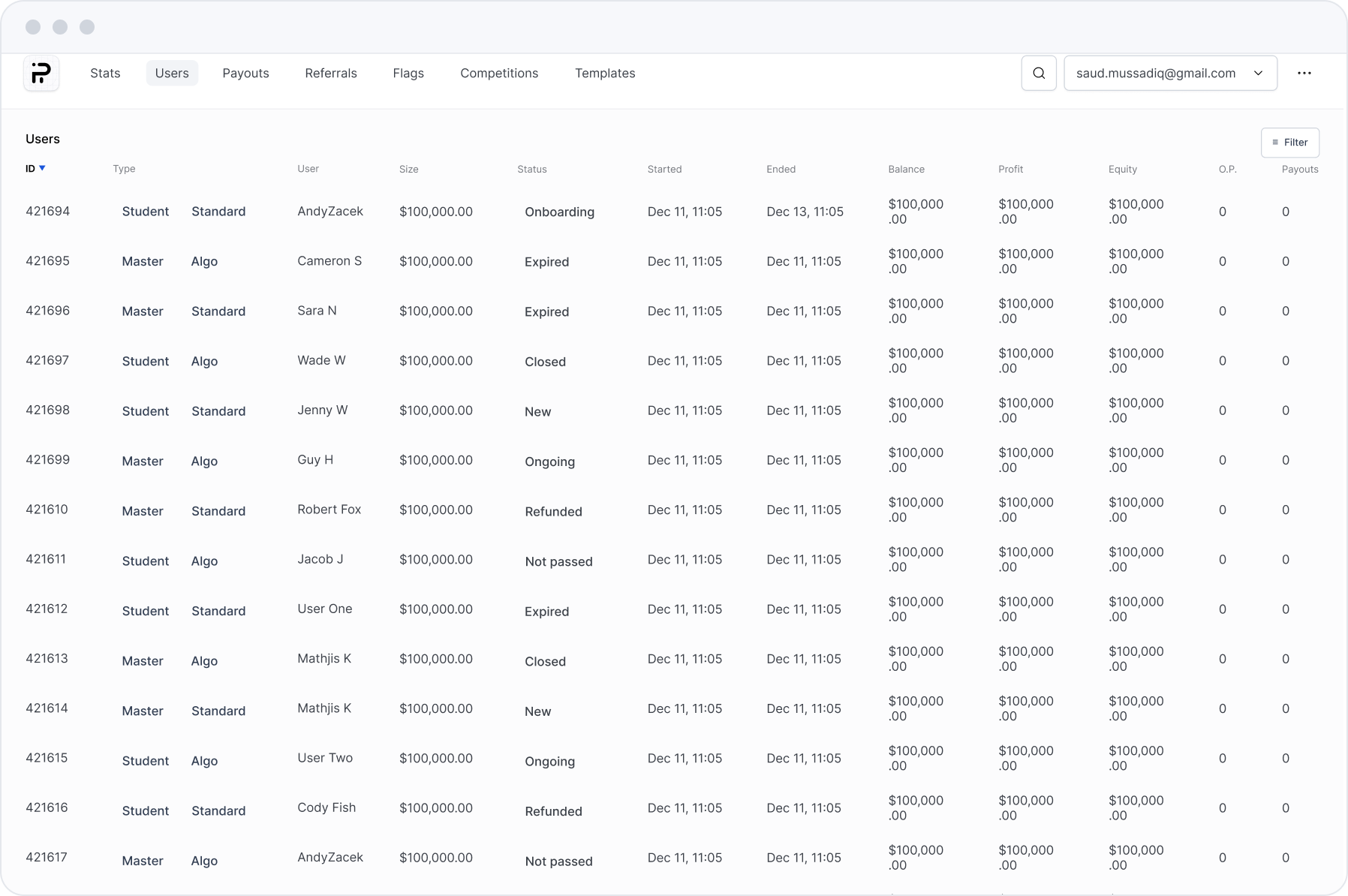
The starting point is the screen below: one table, one Filter button, and nothing that held a result. Operators could narrow a set, but the narrowing did not persist, could not be named or handed on, and produced no counts to read at a glance. Status was coloured text rather than a system, and detail pages printed NaN. Those specific gaps became the seven requirements below.
The interface failed at different points in the same operator loop. Mapping those breaks made every product requirement traceable to the work an operator was trying to complete. This study covers the three stages up to the decision; the action itself sits in the account detail module.
Frame the operational question.
Define the relevant set.
Interpret what the set reveals.
Shared product shell
Top tabs only; no shared workspace carrying query, summary and panel state
→ 06 · The shell
Persistent filtering
One Filter button; nothing persists
→ 06 · The shell
Query stated in words
A global icon only; no way to state a query
→ 09 · Command bar
Named saved filters
Nothing to keep, share or return to
→ 07 · Saved filters
Live summary
No counts of anything, anywhere
→ 08 · Quick stats
Status vocabulary
Red and green words, no system
→ 13 · UI foundation
Defined numeric states
NaN printed straight to operators
→ 08 · Quick stats
03 · Product audit
The audit produced four findings. Two are visible in the live interface, one appears in iteration history, and one remains a design hypothesis grounded in established interaction principles. Each is labelled by evidence type so observation is never presented as operator validation.
A · Query state cannot persist
The interface offers filtering, but no visible way to preserve the resulting query. Once the working context changes, there is no durable state for an operator to reopen.
B · Useful queries cannot be handed off
The interface provides no visible way to name, own or share a completed filter configuration. What one operator discovers cannot become a reusable product object for another.
C · The first redesign iteration fixed the same metrics for everyone
The initial redesigned shell introduced one shared metric strip with no way to add, remove or reorder its contents.
D · Field-by-field filtering widens the gap between intent and action
An operator may begin with a complete request, but the interface requires that request to be decomposed into individual controls in a system-defined sequence. This is a design hypothesis, not an observed operator behaviour.
Ten usability heuristics for user interface design
Jakob Nielsen · Nielsen Norman Group · 1994
Recognition rather than recall: interfaces should keep relevant options and prior state visible or easily retrievable instead of requiring people to remember them. This supports the design rationale behind Finding A, but does not prove product-specific operator impact.
View the Nielsen Norman Group source →The design of everyday things
Don Norman · Revised and expanded edition · Basic Books · 2013
The gulf of execution describes the distance between a person’s intended outcome and the actions an interface makes available. It provides a conceptual lens for Finding D, not validation of the proposed command bar.
View the publisher’s book page →04 · Strategy
Each move answers one finding. Together they turn narrowing from a thing you do to the list into the thing the product is for.
The shell remembers
Filter state, column state and panel state persist with the view instead of resetting on navigation. The filter panel collapses when the operator is reading, and the data canvas expands into the space it releases, so the screen suits the task without ever losing the query.
Answers finding AIn the first redesign iteration, the filter controls sat behind an icon and reset the moment you left the page. The original product had a single Filter button and nothing that held a result.
Query survives navigation, the filter panel collapses to suit the task
Queries get names and owners
A constructed query is saved with a name and an owner, and appears in a flyout. The configuration becomes a reusable object rather than a set of controls to rebuild.
Answers finding BNo saved object; a query exists only while the session lasts
Quick Andy Filters, Bolo filters, Students only
The metric strip belongs to the operator
Quick Stats enters an edit mode. Metrics can be added, removed and reordered, so the strip is configured per-operator rather than fixed for everyone.
Answers finding CFive fixed metrics, identical for everyone
Add, remove and reorder, edited in place
A sentence becomes a filter
A command bar accepts the sentence the operator already has, parses it into visible chips they can correct, then opens the real list with the filter panel populated to match.
Answers finding DTranslate intent into the filter fields, one at a time, in the interface order
Type the intent, check the parse, land in the real view
05 · The product moves
The four moves became one rebuilt foundation and three capabilities the live product had no equivalent of. This page is the map; the sections that follow are the evidence.
The running system, shown above: a table with top tabs and every filter behind one button.
The first redesign iteration rebuilt the existing table inside a shared shell, with a fixed five-card metric strip and temporary filters hidden behind an icon.
The screens in this study. Persistent filters, editable metrics, saved filters, the command bar.
The product shell Rebuilt foundation
Navigation, a metric strip and a persistent filter panel around the existing table.
Saved filters Net new
A filter configuration kept as a named object with an owner and edit history.
Editable metrics Net new
Add, remove and reorder the metric strip; the arrangement persists with the view.
The command bar Net new
A typed sentence parsed into visible chips that open the list already filtered.
06 · The shell
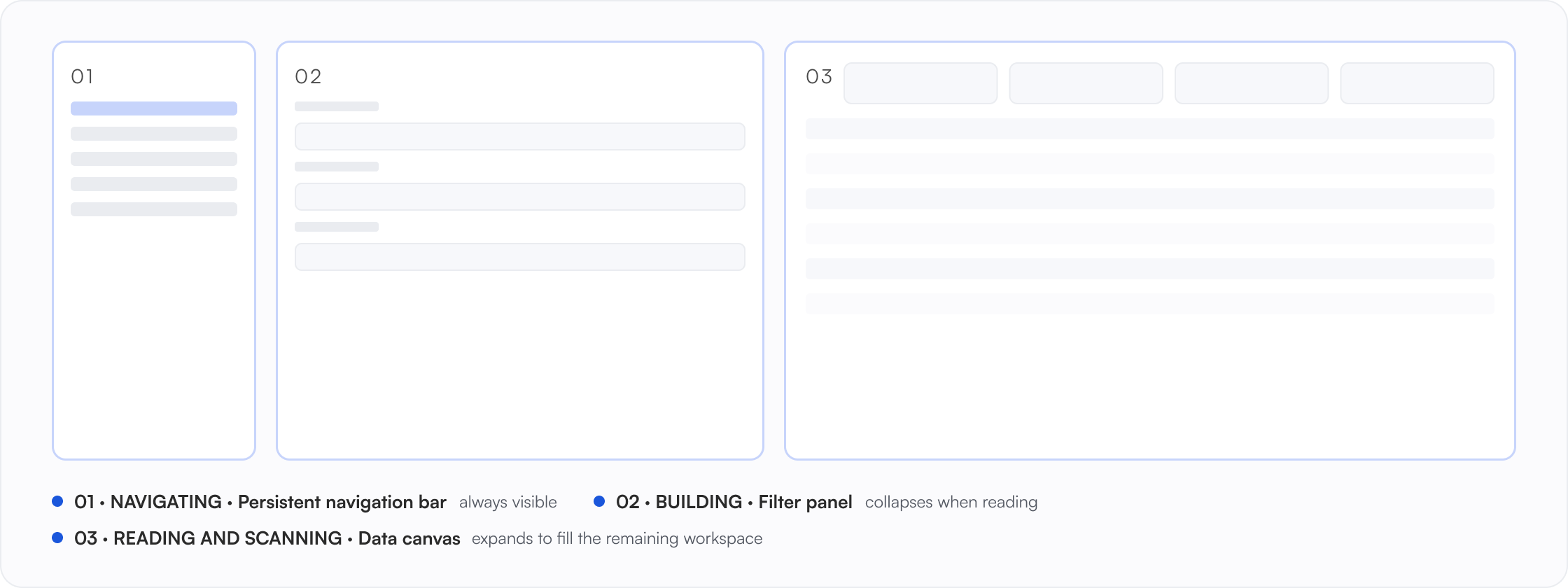
One module is detailed here; all seven inherit the same frame: a persistent top navigation bar, a filter panel carrying the query, a metric strip, and the data canvas. The filter panel collapses; the data canvas expands into the space it releases. Navigation stays visible at all times.
Persistent navigation bar
Module switcher and account identity. Persistent: it stays visible in every state shown here.
Filter panel
Holds the entire query state, including saved filters. Collapses when the operator is reading rather than narrowing.
Data canvas
Quick Stats above a dense table, with contextual drawers. Expands to fill the remaining workspace.
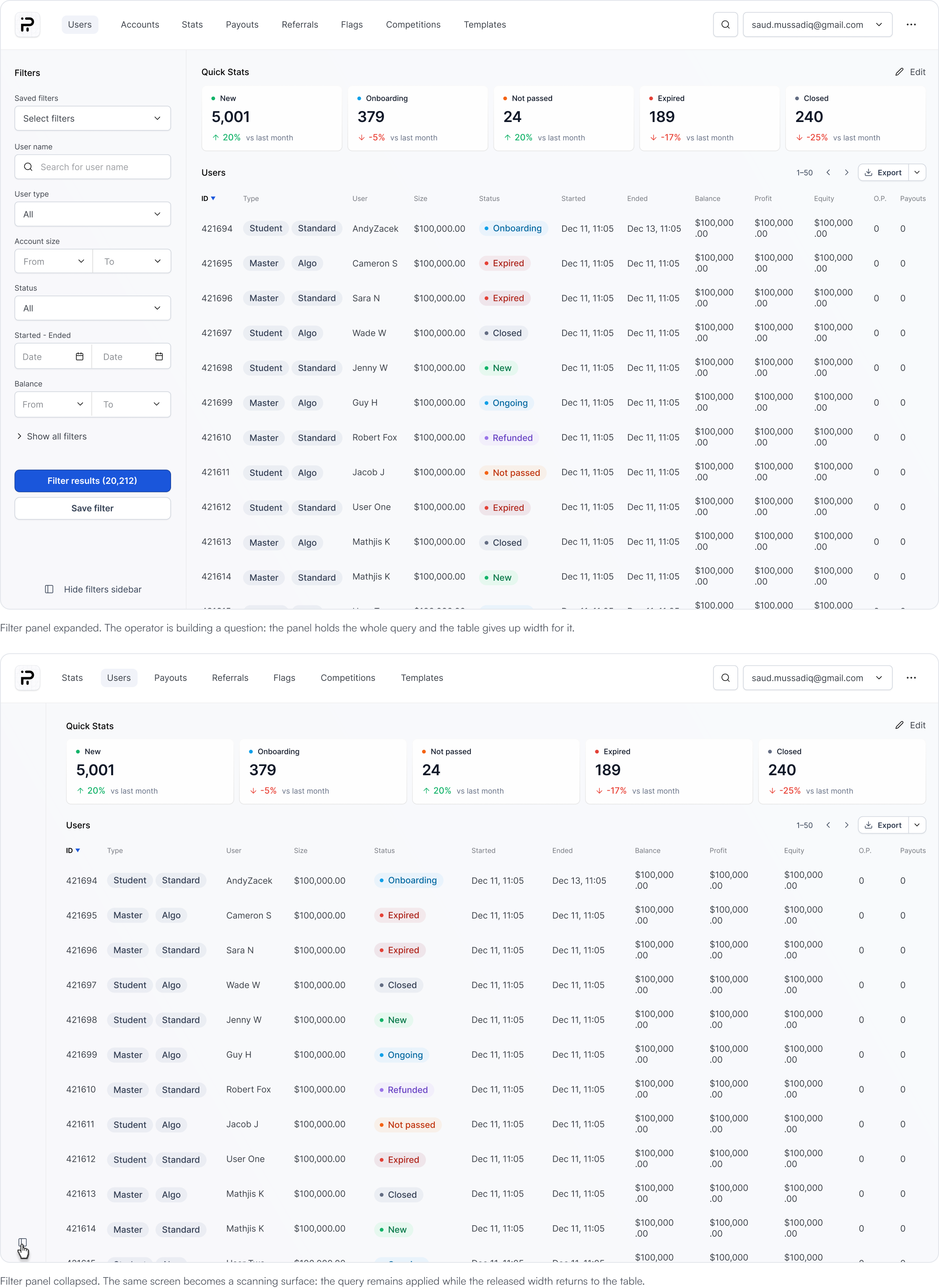
An operator scanning twelve columns collapses the filter panel and the canvas expands into the space it releases. An operator building a complex query keeps the filters open and lets the table shrink. Same screen, two different jobs.
Build the query
Open a user, then go back
The query is still there
Filter state, column state and panel state are held by the view, not the session. In the live product the same trip returned an empty panel.
07 · Saved filters
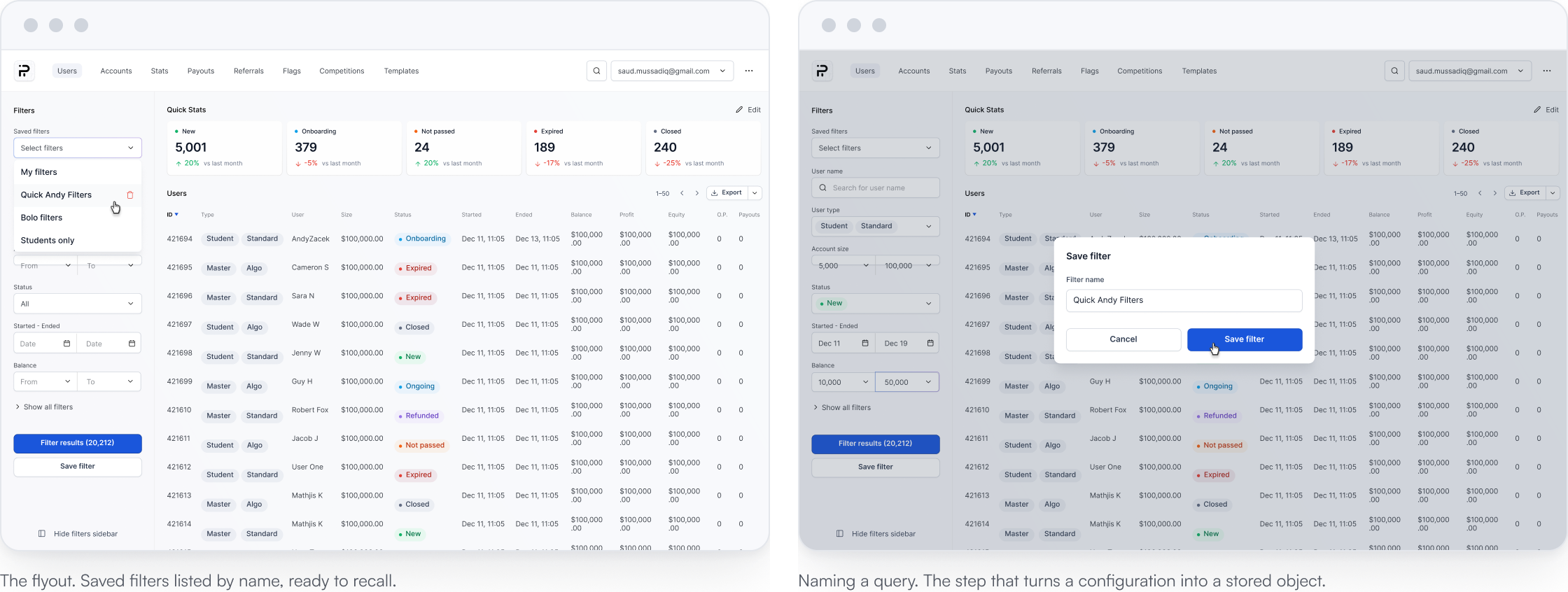
The interaction is small: build a query, name it, save it. Once a query has a name and an owner, it becomes a stored object that can be recalled, shared, reviewed and corrected.
| Without a name | With a name | |
|---|---|---|
| Transferability | No transferable object exists | Selected from a named list |
| Editability | Each copy is edited separately | Edited once, in the shared definition |
| Ownership | No ownership metadata | Owner and last edited are recorded |
| Persistence | Lost when the session ends | Persists as a stored object |
Quick Andy Filters
Owner and last edited metadata are stored on the saved object and demonstrated in the specification below.
The modal titles Save filter, labels the field Filter name, and its primary control reads Save filter.
Proposed safeguard: deletion requires confirmation, names the affected filter and offers session level undo.
A query can now outlive the session and the person. The metric strip is still the same for everyone; the next section fixes that.
08 · Quick stats
The original product carried no summary of any kind: the baseline screen in section 02 opens straight into rows. The first redesign iteration introduced one fixed strip, identical for every operator. Edit mode replaces that fixed configuration with a per-operator arrangement that persists with the view.

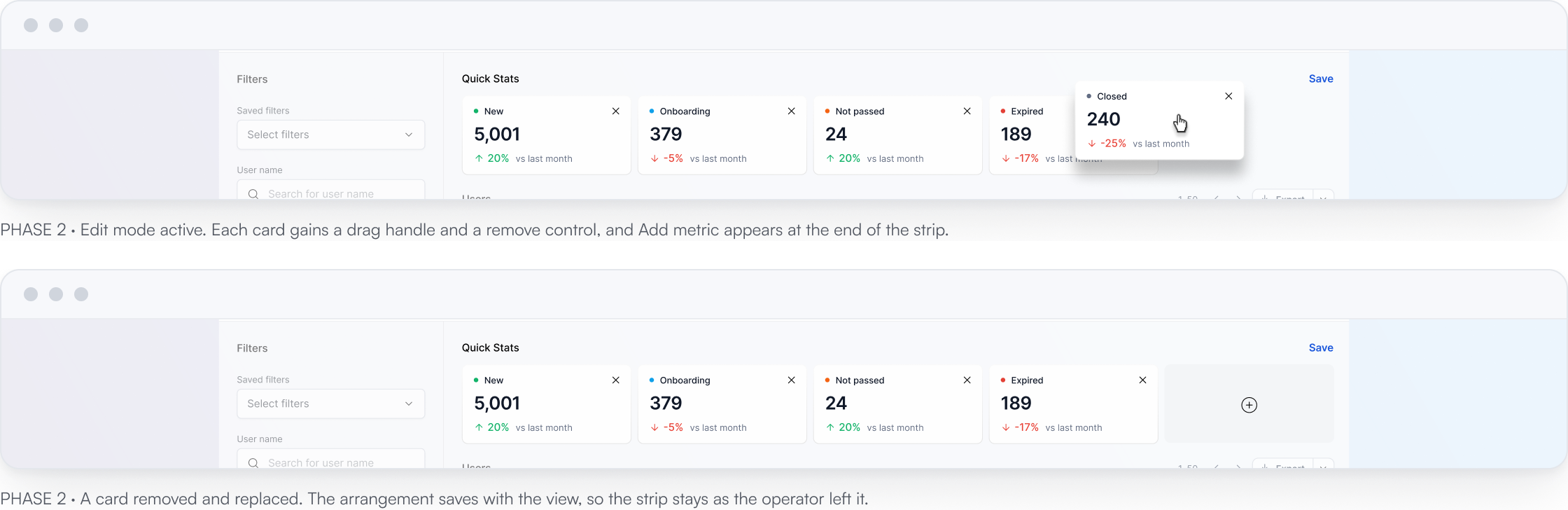
The live product printed NaN when a value could not be computed. A card now states which of these five it is, and never shows a number it does not have.
The original had no strip. The first redesign iteration fixed five cards for every operator. Edit mode now allows add, remove and reorder, and the arrangement persists with the view. Designed behaviour; adoption was not measured.
The strip now belongs to the person reading it. The list now holds persistent queries, owned filters and configurable metrics. The remaining product move is the command bar.
09 · The command bar
Saved filters retrieve questions that already have a name. They do nothing for a new query that has never been built. A command bar accepts the sentence directly. It is also the only place in this module where the product can confidently misunderstand somebody and still look like it worked.
An accelerator over the existing filter model, not a replacement: nothing runs until the operator has seen the parse, and the panel route stays available throughout.
After the parse appears, Enter or Run query executes it. Before the parse is shown, neither action runs anything. Escape closes the bar and returns the operator to the originating screen.
10 · Command bar · type and parse
The bar is called with one shortcut and parses the sentence live into structured chips beneath it. The operator sees exactly what the system understood before anything runs.
One shortcut, ⌘K on macOS or Ctrl+K on Windows, opens the bar as a global overlay. Escape returns the operator to the originating screen without changing query state.
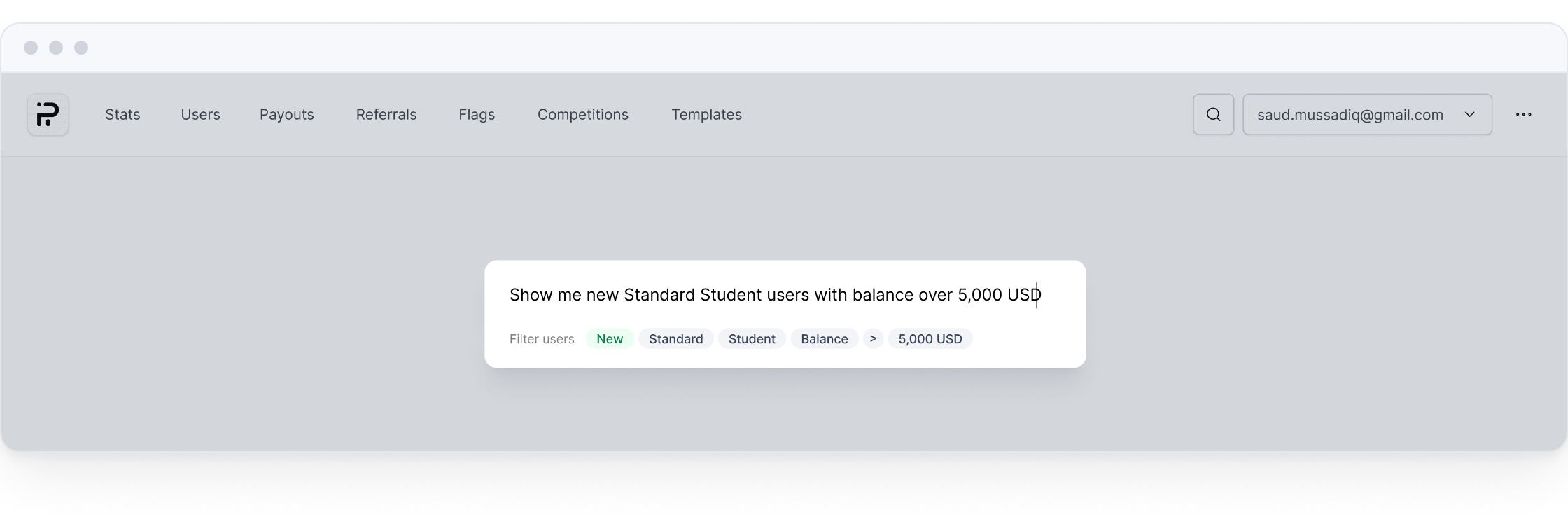
1 — The sentence, in the operator language: new Standard Student users with balance over 5,000 USD.
2 — The parse, as editable tokens: New · Standard · Student · Balance · 5,000 USD.
Run query · Enter to run. Available only once the parse is visible.
A natural language interface fails at the moment the person cannot tell what the machine heard. Showing the parse as editable tokens turns a black box into a glass box, and it does so before the query runs rather than after the results look wrong.
| Without the chips | With the chips | |
|---|---|---|
| Where errors surface | In the result set, as a plausible but wrong list | In the parse, before anything is run |
| How a person recovers | Rewrite the sentence without knowing which term failed | Edit the token that is wrong |
| What the operator learns | Nothing about how the system reads them | The vocabulary the system actually supports |
| Execution gate | Query runs immediately on submit | Query runs only after the parse is shown |
11 · Command bar · the result
The bar does not return an answer. It opens the existing Users module with the filter panel populated from the parse. From there, the query can be adjusted, saved and shared using the same controls as a manually constructed query.
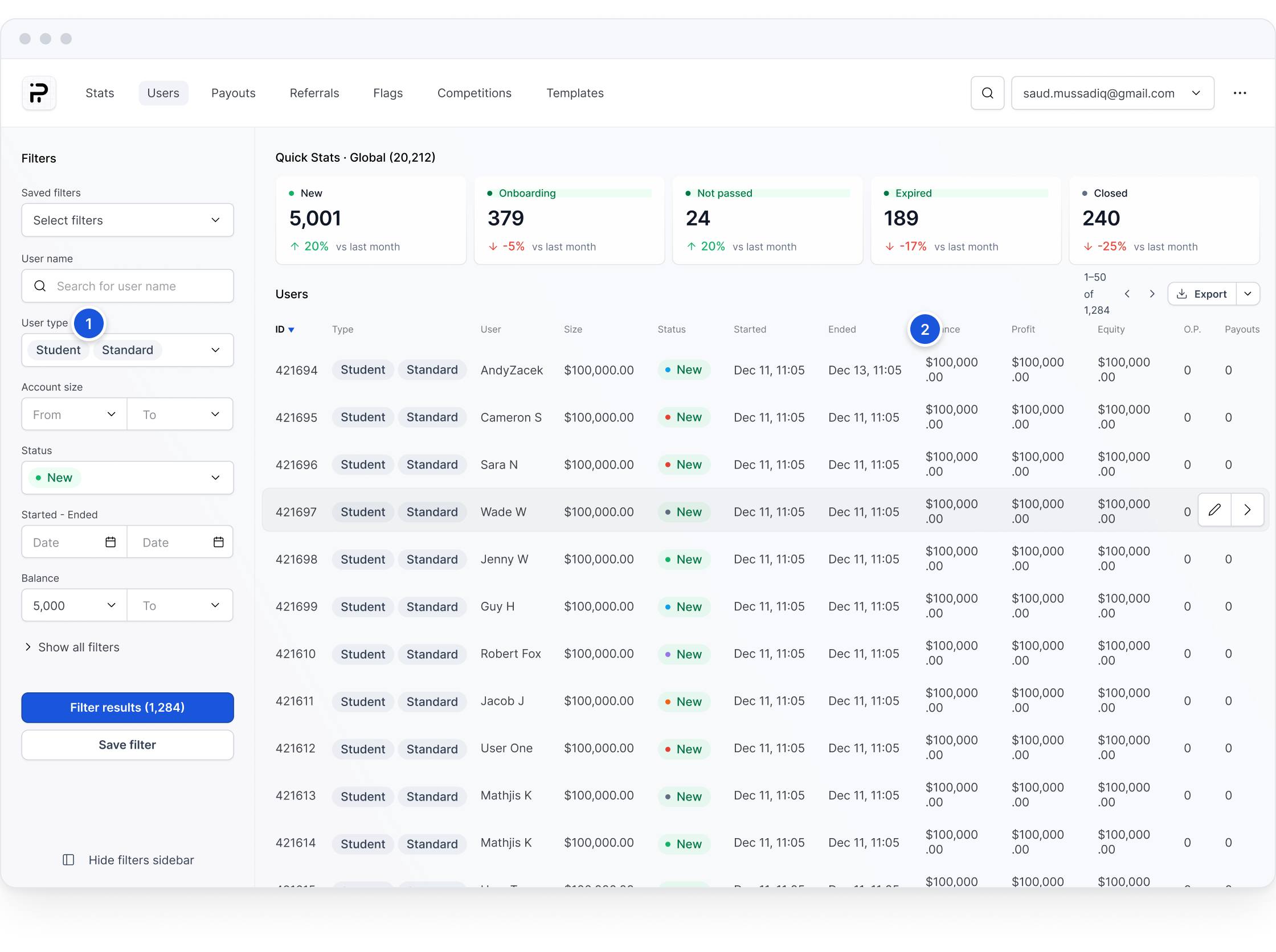
1 — The filter panel, populated from the parse: status New, type Student and Standard, balance above 5,000 USD.
2 — Quick Stats stays global here, labelled Global (20,212), because its values describe the whole population rather than the 1,284 result. Scoping the summary to the active filter is a known gap, listed in what should be measured next.
The command bar is an entry route into the existing product, not a separate result surface. The same table, filters and saved view controls remain available on arrival.
The route with the fewest setup steps: a sentence, parsed in front of the operator, landing in the shell from section 06.
12 · States and edge cases
An accelerator is judged on its worst input, not its best. These six states carry the rules that keep the bar honest when it cannot do what was asked.
Nothing parsed
Understanding failure
No filters recognised in that phrase
Open filters insteadThe bar never guesses. If no chip can be produced it says so and hands the operator to the filter panel with the raw text preserved, rather than running an empty or arbitrary query.
Partly parsed
Understanding failure
Understood: Student · Balance 5,000. Not understood: recently
Edit the parseA partial understanding is shown as a partial parse. The recognised chips stand, the unrecognised words are named explicitly, and nothing runs until the operator accepts what is there.
Ambiguous term
Understanding failure
Closed could mean account status or challenge outcome
Choose oneWhere one word maps to two fields, the bar asks rather than picking. A silent choice here produces a plausible list that is quietly about the wrong thing, which is the most expensive failure available to it.
Parse is right, result is empty
Result failure
0 of 20,212 users match this filter
Edit constraintsAn empty result is a finding, not a dead end. The chips stay on screen so the operator can see which constraint eliminated everything and loosen that one specifically.
Permission does not cover it
Permission failure
Your role cannot view payout amounts
Remove restricted criterionThe bar can express queries an operator is not entitled to run. It identifies the restricted criterion, explains why it cannot run and prevents execution until that criterion is removed.
Parser slow or offline
System failure
Command bar is taking longer than usual
Use filters insteadThe bar degrades, the product does not. If parsing is delayed, the interface reveals progress and offers the filter panel as a fallback. The raw sentence is preserved either way; exact timing thresholds require engineering validation.
13 · UI foundation
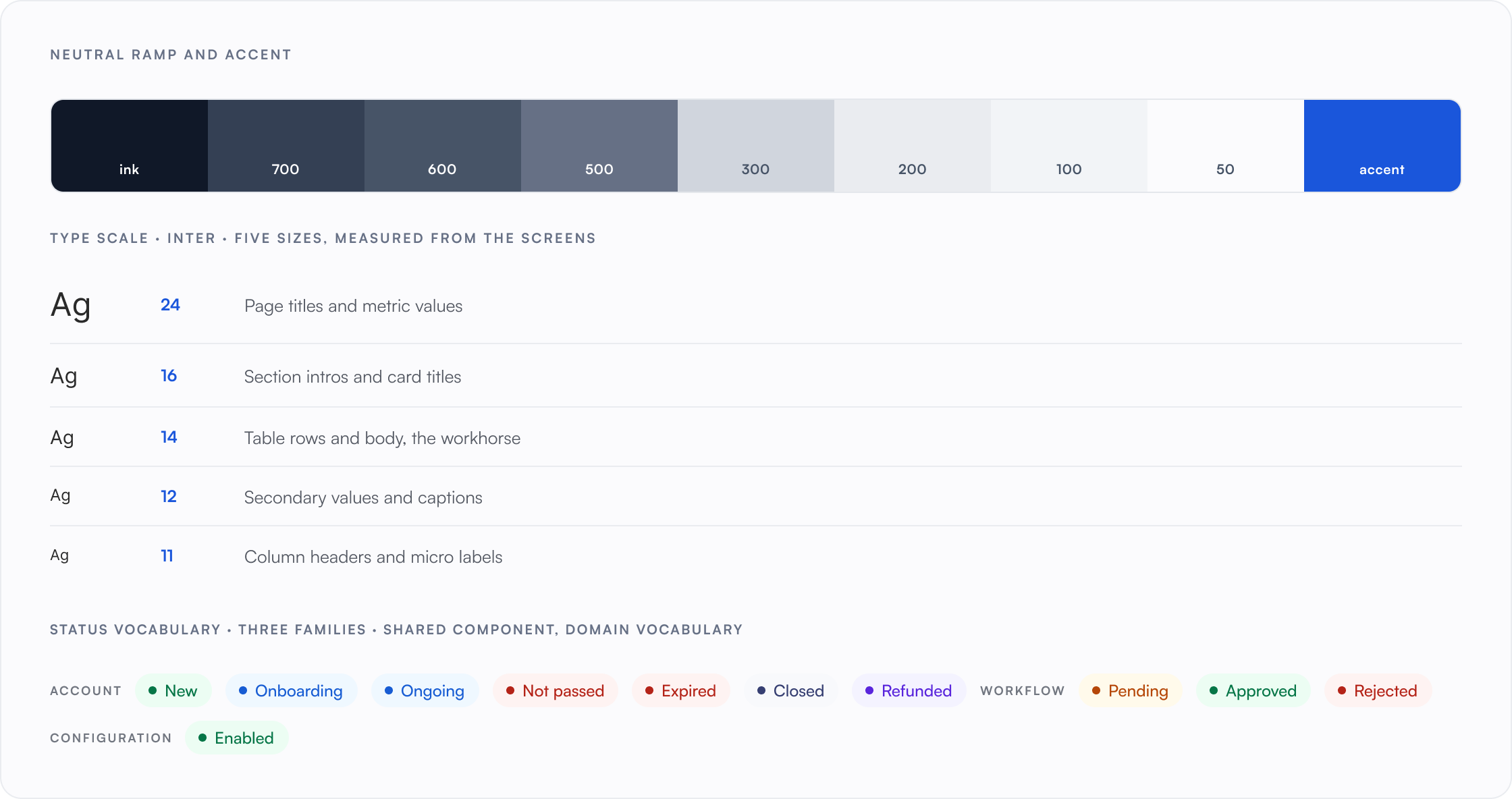
The module inherits an Untitled UI foundation: neutral ramp, radii, type scale and input primitives. On top of it sits a shared status component reused across all seven modules, with each domain supplying its own controlled vocabulary. What follows is the part of that system this module actually uses.
Typeface
Inter throughout, five sizes: 24 for page titles and metric values, 16 for section intros and card titles, 14 for table rows and body, 12 for secondary values and captions, 11 for column headers and micro labels.
Neutral ramp
Untitled UI greys from #101828 ink to #f2f4f7 surface, with #eaecf0 as the single table and panel rule.
Accent
#1a56db for action and selection. A blue to purple gradient is reserved for hero metrics so emphasis stays scarce.
Status vocabulary
The account family: New, Onboarding, Ongoing, Not passed, Expired, Closed, Refunded. The badge component and its colour rules are shared; each domain supplies its own vocabulary. Colour reinforces the text label and never carries meaning alone.
Table primitive
One table serves a twelve-column user list, a payout queue and a per-row error log, with shared sort, hover, pagination and export.
Density
Optimised for high-density desktop workflows, with compact rows and WCAG AA text contrast.
Every interactive element carries a 2-pixel #1a56db ring at a 2-pixel offset. Focus is never removed, only styled.
The table uses a roving tab index: arrow keys move row focus, Enter opens the row, Escape returns to the list. The command bar opens with ⌘K on macOS or Ctrl+K on Windows and closes with Escape, returning focus to its origin.
Status is never colour alone: every badge carries its text label. The parse chips announce as a list, each with its token type: status New, type Student.
Column headers are real headers with sort state announced. The result count is a live region, so 1,284 results is spoken when a filter lands.
The bar and drawer use 150-millisecond fades, replaced by instant transitions when reduced motion is requested. Nothing meaningful is carried by animation alone.
Contrast ratios above are computed from the actual palette values. Everything else on this card is designed behaviour that an audit would need to confirm in the build.

Four designers worked across seven modules in parallel, with the foundation shared between them. I led the module documented here; the other designers carried the remaining six. Any module-specific need either had to fit the shared system or justify changing it for everyone, keeping the platform coherent without erasing necessary domain differences.
14 · What this demonstrates
Two outcomes were measured after rollout: time to reach the target set and the number of context switches. Everything else below is a structural property of the designed screens, checkable by reading them.
Three input methods, one editable destination. The first and last steps do not change; the product shortens the step between them.
Two measures moved; the rest of this list is still open. What the redesign establishes either way is the system required to test it: persistent queries, inspectable interpretation, and one editable destination.